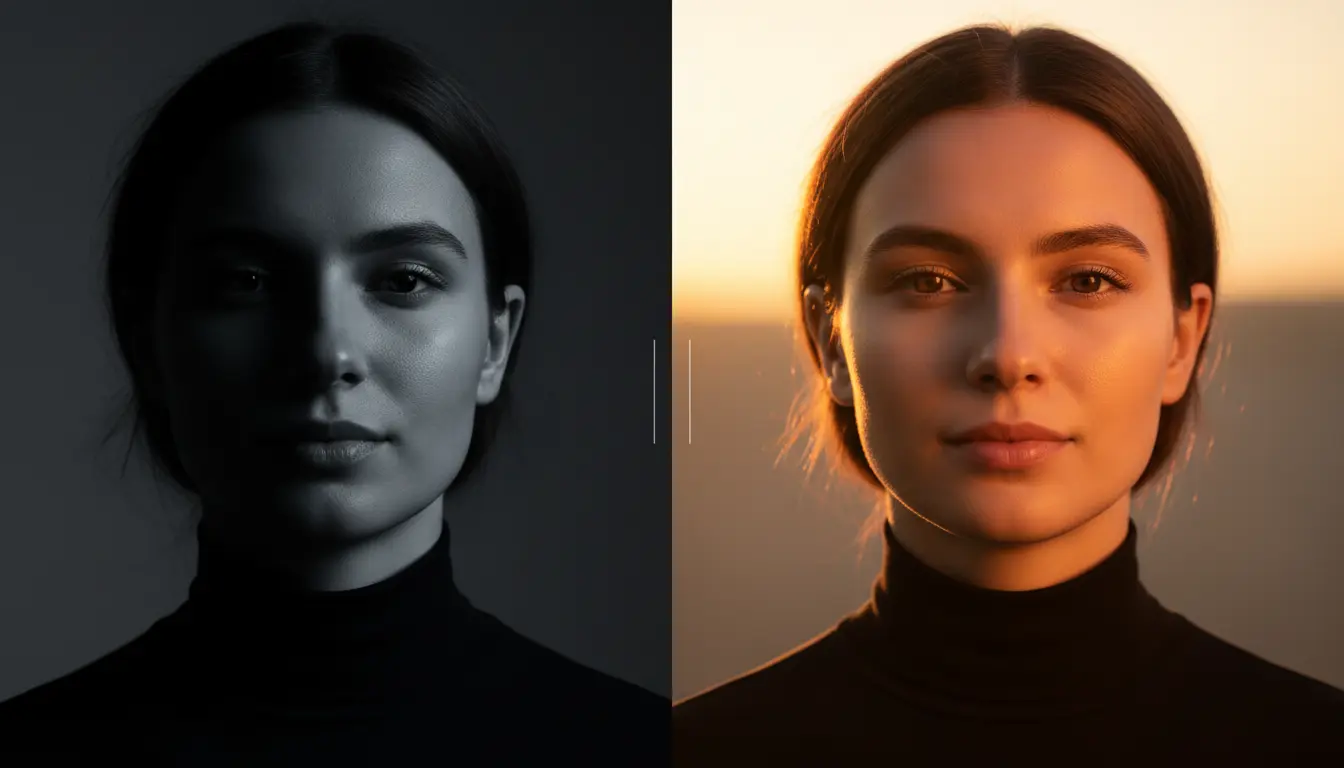
You know the feeling. You took what should have been a perfect shot—the composition is great, the moment is right—but the lighting ruined everything. Too dark, harsh shadows across someone's face, that ugly yellow cast from indoor bulbs, or a blown-out sky that turned pure white.
Before AI, fixing bad lighting meant hours in Photoshop wrestling with curves, levels, masks, and blend modes. Most people just accepted the ruined photo and moved on.
Now? You describe what you want and AI handles the technical work. Here's how to rescue photos you thought were lost forever.
The Most Common Lighting Problems (And How AI Solves Them)
Bad lighting comes in predictable flavors. Once you recognize what went wrong, fixing it becomes straightforward.
Underexposed Photos (Too Dark)
This happens constantly—shooting indoors, in shade, or anytime your camera's auto-exposure gets confused by a bright background. The subject looks like a silhouette while everything else is fine.
Traditional fix: Boost exposure globally, then mask the already-bright areas to prevent blowing them out. Tedious.
AI fix: "Brighten the shadows without affecting the highlights" or "Make the person's face brighter." The AI understands what needs lifting and what should stay put.
Overexposed Photos (Blown Out)
The opposite problem. Bright sunlight, reflective surfaces, or shooting toward windows can blow out portions of your image into pure white. Once detail is gone in the original, it's technically unrecoverable.
AI fix: "Recover the sky detail" or "Reduce the brightness of the window." AI can intelligently generate plausible detail in blown areas—not perfect recovery, but often surprisingly convincing.
Harsh Midday Shadows
Direct sunlight at noon creates unflattering shadows under eyes, noses, and chins. Great for dramatic desert landscapes, terrible for portraits and product photos.
AI fix: "Soften the shadows on her face" or "Make the lighting look like golden hour." The AI can simulate diffused lighting without affecting the rest of the scene.
Mixed Color Temperature
Indoor photos often suffer from competing light sources—warm tungsten bulbs mixed with cool daylight from a window. Skin tones look wrong, whites aren't white, and the whole image feels off.
AI fix: "Fix the white balance" or "Make the lighting consistent and natural." AI evaluates the entire scene and normalizes the color temperature intelligently.
Flat, Boring Light
Overcast days and fluorescent offices produce even, shadowless light. Technically correct exposure, but zero visual interest. Photos look lifeless and amateur.
AI fix: "Add dramatic lighting" or "Make it look like sunset" or "Add depth with directional light." AI can introduce lighting characteristics that weren't in the original capture.
Specific Prompts That Actually Work
Vague prompts get vague results. Here's language that produces consistent, predictable fixes:
For dark photos:
- "Brighten the shadows while keeping the highlights natural"
- "Lift the exposure on the subject's face"
- "Make the dark areas visible without washing out the image"
- "Increase brightness but maintain contrast"
For harsh shadows:
- "Soften the shadows under her eyes and chin"
- "Fill in the harsh shadows on his face"
- "Make the lighting look like soft window light"
- "Reduce the contrast between highlights and shadows"
For color issues:
- "Fix the yellow indoor lighting"
- "Correct the white balance to neutral"
- "Remove the blue color cast"
- "Make the skin tones look natural"
For creative enhancement:
- "Make it look like golden hour lighting"
- "Add warm sunset tones"
- "Create dramatic side lighting"
- "Make it look like professional studio lighting"
Real-World Use Cases
Real Estate Photography
Interior shots are lighting nightmares. Windows blow out while rooms go dark. Mixed bulb types create color chaos. And you can't always schedule shoots for optimal natural light.
AI lighting fixes let you balance interiors with exterior views, correct mixed color temperatures, and make spaces look bright and inviting without HDR bracketing or flash setups.
Product Photography
Consistent lighting sells products. But not everyone has a softbox setup or lightbox. AI can normalize lighting across product shots taken in different conditions, add subtle shadows for depth, and correct color casts that make products look different from reality.
Event and Wedding Photography
Venues have terrible lighting—dim, mixed color temperatures, harsh spotlights. You're moving fast and can't control conditions. AI fixes can rescue shots that would otherwise be unusable: reception photos in dark ballrooms, ceremony shots with backlit windows, candids under unflattering fluorescents.
Social Media Content
Perfect lighting every time isn't realistic when you're posting daily. AI lets you maintain visual consistency even when shooting in variable conditions—same warm, polished look whether you shot at noon or midnight.
Old Photo Restoration
Vintage photos often suffer from fading, color shifts, and uneven exposure from age. AI can restore proper contrast, correct yellowed tones, and bring back detail that's faded over decades.
What AI Can and Can't Do
AI lighting tools are powerful but not magic. Understanding the limits helps you get better results.
AI excels at:
- Lifting shadows while protecting highlights
- Color correction and white balance
- Simulating different lighting conditions
- Softening harsh shadows realistically
- Adding warmth or coolness to overall tone
- Enhancing flat lighting with depth
AI struggles with:
- Recovering completely blown-out areas (no data to work with)
- Extremely underexposed photos (too much noise when lifted)
- Physically impossible lighting changes
- Matching lighting across multiple photos automatically
The sweet spot is photos that are "almost there"—the information exists in the image, it just needs intelligent adjustment. Garbage in still equals garbage out, but "flawed but fixable" becomes "actually good" surprisingly often.
Tips for Better Results
Be specific about what's wrong. "Fix the lighting" is vague. "Brighten the face and reduce the harsh shadow under the chin" tells the AI exactly what to target.
Fix one thing at a time. Complex prompts with multiple requests can confuse results. Fix the exposure first, then adjust color temperature in a second pass if needed.
Reference real lighting conditions. "Golden hour," "overcast day," "studio softbox," and "window light" are conditions the AI understands and can simulate convincingly.
Don't overdo it. Subtle improvements look professional. Aggressive fixes look artificial. If you're dramatically transforming the image, the result often screams "edited."
Consider the whole image. Fixing a face but leaving mismatched lighting in the background looks wrong. Think about how light would naturally fall across the entire scene.
The Professional Photographer's Perspective
Professional photographers still shoot in RAW, still use proper lighting setups, still understand exposure theory. AI doesn't replace that knowledge.
But AI changes the math on which photos are worth trying to save. That shot where the flash didn't fire? Might be recoverable. The backup camera with worse dynamic range? Now it's usable. The candid moment captured in terrible light? Worth attempting a fix.
AI also accelerates client delivery. Quick lighting fixes on dozens of images takes minutes instead of hours. More time for creative work, less time on technical corrections.
Getting Started
Ready to fix those photos sitting in your "almost deleted" folder?
- Start with your worst lighting failures. Find photos with obvious problems—too dark, ugly shadows, wrong colors. These show the most dramatic improvement.
- Identify what's specifically wrong. Is it exposure, shadows, color temperature, or some combination? Name the problem before trying to fix it.
- Try ZeroEdit free. Upload your problem photo, describe the lighting fix you need, and see the result in seconds. Three free edits to test with your actual photos.
- Iterate if needed. First attempt not perfect? Adjust your prompt and try again. "A little brighter" or "less warm" can dial in exactly what you want.
- Save your winning prompts. When you find descriptions that work well for your typical photos, reuse them.
Bad lighting doesn't have to mean bad photos. Not anymore.
Ready to rescue your underexposed, overexposed, and badly-lit photos? Try ZeroEdit free—three edits, no credit card required.